Table of Contents
ToggleIntroduction
Data centers look like “air conditioning” problems, but they rarely behave like comfort spaces. The dominant load is IT equipment converting electrical power into heat—almost entirely sensible heat (temperature rise), with comparatively small latent loads (moisture removal). That load shape is why the same tonnage can perform very differently depending on Sensible Heat Ratio (SHR).
SHR isn’t just a spec-sheet footnote. It changes what your cooling system actually does to air: how cold the coil must run, how much moisture it strips, what the leaving-air condition looks like, and whether you end up spending real energy undoing your own cooling (reheat) or adding moisture back (humidification).
If you’ve ever seen a server room that’s “cold but unstable,” the root cause is often a mismatch between the load SHR (what the room needs) and the equipment SHR (what the unit delivers). This mismatch is especially common when comfort air conditioners are applied to IT spaces. The risks aren’t theoretical:
Energy waste from unnecessary dehumidification and reheat/humidification cycles
Humidity instability (dew point drift, swingy RH) that complicates operations and compliance
Uptime risk from hot spots, nuisance alarms, and condensation-margin mistakes during part-load or mixed-air events
This article explains the fundamentals of SHR, how it shows up on the psychrometric chart, and how it should shape equipment selection and controls—using criteria that align with ASHRAE TC 9.9 thermal guidance (temperature and moisture limits) rather than comfort-HVAC assumptions.
SHR Fundamentals: Sensible Heat Ratio basics
Definition and formula
Sensible Heat Ratio (SHR) is the fraction of total cooling devoted to sensible heat removal:
[ mathrm{SHR} = frac{Q_s}{Q_s + Q_l} ]
Where:
(Q_s) = sensible cooling (temperature reduction)
(Q_l) = latent cooling (moisture removal)
A value closer to 1.0 means the load (or the equipment’s delivered capacity) is mostly sensible. A lower value means a larger share of capacity is being used to condense water out of the air.
It’s important to keep two ideas separate:
Load SHR: what the room needs based on IT heat, people, ventilation, envelope leakage, and humidification strategy.
Equipment SHR: what the cooling unit delivers at a given operating point (entering air condition, airflow, coil temperature, compressor capacity, etc.).
When those two don’t align, the system is forced to “fight itself” with controls—usually by overcooling and then reheating, or over-drying and then re-humidifying.
Key Takeaway: In data center cooling, “tons” without SHR is like “kW” without power factor—usable, but incomplete.
Psychrometric impacts
On a psychrometric chart, SHR shows up as the slope of the process line from the entering air state to the leaving air state.
High SHR (mostly sensible): the process line trends more horizontal—dry-bulb temperature drops with relatively small change in moisture content.
Low SHR (more latent): the process line slopes downward more steeply—meaning more moisture removal per degree of sensible cooling.
In practical terms, this slope is controlled by the coil’s effective surface temperature and the relationship between:
entering-air dew point
coil surface temperature (apparatus dew point)
airflow across the coil
If the coil runs well below the entering-air dew point, it will condense significant moisture (latent cooling). That can be necessary in office buildings with outdoor air and people—but it’s often unnecessary in tight, low-occupancy IT spaces.
This is also why dew point is often the better operational moisture metric than RH. Relative humidity is temperature-dependent: you can change RH by changing temperature even if the absolute moisture content doesn’t change. Dew point tracks the actual moisture level and the condensation threshold more directly. The U.S. National Weather Service explains this clearly in its primer on dew point vs. relative humidity.
Data center SHR ranges
Most data centers and computer rooms operate with a high load SHR because the dominant heat source is IT equipment. Many industry summaries and vendor explainers describe data centers as typically operating in the ~0.80–0.95 SHR range, depending on ventilation/outdoor air, humidification practice, and envelope tightness.
On the equipment side, modern precision cooling systems are commonly designed for SHR ≥ 0.90, and some precision platforms are engineered around ~0.95 SHR class performance. Vertiv notes that many precision systems are designed with SHR at least 0.90. By contrast, comfort systems are frequently described as lower SHR units, because they’re expected to remove meaningful latent load in occupied spaces.
The takeaway isn’t that one number is always “right.” The takeaway is that your room’s SHR is an input, not an output—and it should be matched intentionally.
Precision vs. Comfort ACs
Airflow and ΔT mismatch
A lot of “wrong equipment” outcomes happen because airflow strategy is treated as an afterthought.
Comfort HVAC is often built around:
lower airflow per unit capacity
larger airside (Delta T) (bigger temperature drop across the coil)
colder coil surfaces (which drive latent removal)
Data center precision cooling, by contrast, is typically built around:
higher airflow to manage rack inlets and prevent stratification
smaller (Delta T) across the coil, because the priority is stable inlet temperature under varying load distribution
coil/control strategies that avoid unnecessary moisture stripping
When you apply a comfort unit designed for a different airflow/(Delta T) regime, you can end up with the worst combination: insufficient effective sensible capacity at the inlets plus moisture control side effects.
Humidity and control strategy
Humidity control failures in IT rooms are rarely caused by “not enough cooling.” They’re more often caused by a control strategy mismatch.
Two common patterns:
Temperature-only control with unmanaged moisture
Comfort units often prioritize zone dry-bulb temperature.
In a data center, that can hide moisture risk until conditions shift (part-load, mixed air, humid weather infiltration).
Over-dehumidification + correction cycles
If the coil runs cold enough to condense moisture aggressively, the space can drift too dry.
Operators then add humidification to stay within acceptable limits, which is literally paying to undo your own latent cooling.
ASHRAE’s thermal guidance is often summarized as keeping inlet temperatures within a defined range while controlling moisture using either RH or dew point bounds. For a plain-language summary of those envelopes, Sunbird provides an overview of data center temperature and humidity standards, and ASHRAE publishes the canonical reference as the TC 9.9 Thermal Guidelines reference card (5th edition, 2021).
⚠️ Warning: Treat dew point as a first-class control variable. RH can look “fine” while dew point creeps into a condensation-risk zone during temperature changes.
Energy and reliability impact
If SHR is misaligned, you don’t just waste kWh—you also create operating variability.
Energy impact (typical failure mode)
A low-SHR comfort unit “spends” more of its total capacity on latent removal.
That reduces the usable sensible capacity for IT heat.
The system runs longer and/or requires more installed capacity to hold temperature.
If it over-dries, you add humidification; if it over-cools, you add reheat—both are avoidable energy penalties.
Reliability impact (what project directors care about)
Hot spots can appear when airflow and control logic aren’t designed for high-recirculation, high-load-density environments.
Humidity swings create nuisance alarms, complicate acceptance testing, and increase the chance of human-error “fixes” (like setpoint whiplash).
Condensation risk shows up when dew point management is weak and surfaces drop below the room dew point (for example, in mixed-air events, coil transitions, or poorly controlled economizer sequences).
If you’re comparing architectures, it helps to evaluate “precision cooling vs comfort cooling” as a capacity-allocation problem (sensible vs latent), not a brand debate.
Coolnetpower supports program teams by integrating precision cooling equipment selection with airflow design and control/monitoring integration—so SHR assumptions, containment, and sensor placement are aligned before commissioning, not discovered during handover.
Selection Framework
Match SHR and capacity
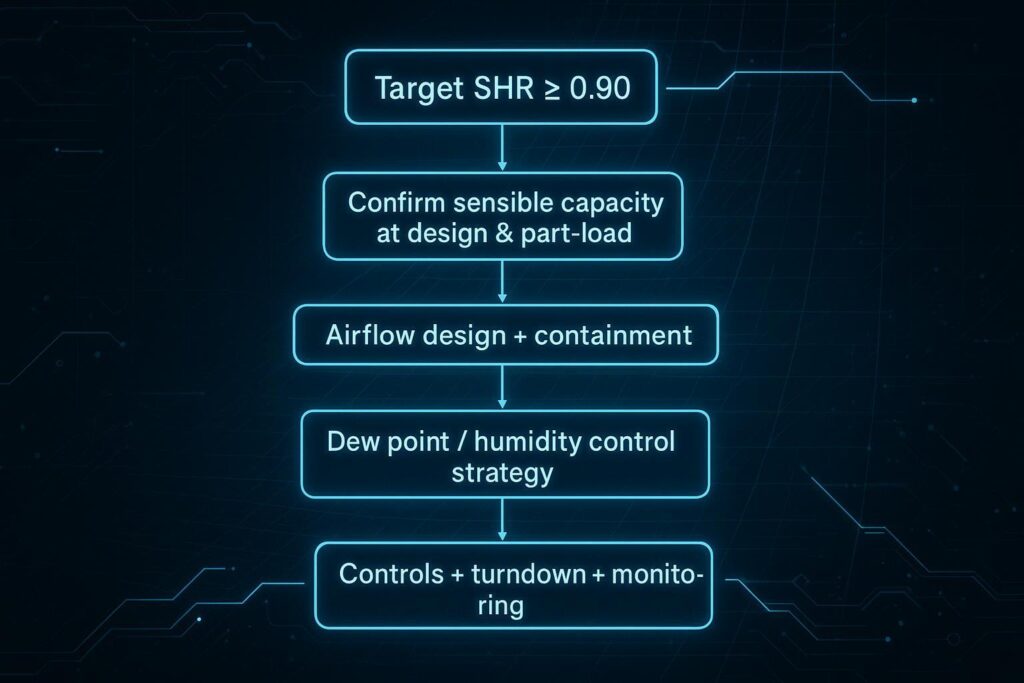
Start with a simple rule: size and select on sensible capacity at the operating condition you’ll actually run, not just nameplate total capacity.
Practical steps:
Estimate the load SHR
In many IT rooms, sensible dominates, but don’t assume “100% sensible.”
Account for outdoor-air requirements, infiltration, humidifier strategy, and any people/process loads.
Ask for sensible capacity at your conditions
Provide vendors with entering air temperature, target supply temperature, and target dew point limits.
Ask for the equipment’s sensible and total capacity at those conditions (and the implied SHR).
Check part-load behavior
Many issues appear at part load: compressors/unloading, fan turndown, coil temperature control, and humidification staging.
Make sure the unit can hold your moisture limits without constant correction cycles.
If you want a quick reference for the SHR formula and terminology, Engineering ToolBox provides a concise definition of Sensible Heat Ratio (SHR).
Airflow and containment
In high-SHR spaces, airflow management often determines whether the sensible capacity you bought actually reaches the server inlets.
A practical procurement framing:
Define the air path first: hot aisle/cold aisle orientation, return-air path, and leakage control.
Treat containment as a performance enabler: it reduces bypass and recirculation, making SHR “real” at the rack.
Specify measurement points: rack inlet temperature sensors, return-air sensors, and a dew point sensor strategy.
For readers evaluating room-based vs row-based approaches, Coolnetpower’s overview on CRAC vs CRAH selection and its guide to in-row cooling units can help clarify how airflow path and control authority change with architecture.
Controls, turndown, monitoring
SHR alignment is necessary, but it’s not sufficient. A high-SHR unit can still produce bad outcomes if controls are wrong.
Controls questions that prevent expensive surprises:
What is the primary moisture variable—dew point or RH?
Dew point control is often easier to manage safely because it maps directly to condensation threshold.
How does the system behave during load transients?
IT loads shift by row and rack; controls need stable logic under changing return-air conditions.
What turndown is available, and what stays stable at turndown?
Fan speed, compressor capacity, valve control (for chilled water), and humidification staging all matter.
How is monitoring implemented?
Alarm thresholds, sensor placement, trend logging, and integration with BMS/DCIM determine whether deviations are caught early.
Finally, treat redundancy as part of “controls.” A practical design question is not only “Do we have N+1?” but also: Can the remaining units hold temperature and dew point within limits under failure conditions without pushing coils into unsafe moisture behavior?
Conclusion
SHR is the quiet driver behind many cooling outcomes that teams attribute to “bad luck” or “finicky equipment.” If your cooling approach isn’t aligned to the high sensible fraction of IT loads, you will usually pay for it twice: first in energy, and then in operational instability.
To keep the decision practical:
Prioritize SHR alignment with the IT load (sensible capacity where you actually operate).
Design for stable temperature and moisture control with minimal reheat and minimal corrective humidification.
Verify part-load performance, monitoring strategy, and redundancy behavior so uptime is protected during real operating conditions—not just at design point.
Key Takeaways:
Match equipment SHR to your load SHR so capacity is spent on sensible cooling, not unnecessary latent removal.
IT cooling is mostly sensible, but controls are moisture-limited. Use dew point as a primary guardrail; RH alone can mislead.
Treat airflow/containment and controls as part of the cooling “capacity,” not accessories.
If you want a procurement-friendly checklist version of the selection framework (inputs to request from vendors, part-load questions, and commissioning acceptance checks), request a copy and tailor it to your target ASHRAE equipment class and redundancy model.