Table of Contents
ToggleIntroduction
Who this guide is for and how to use it
This guide is for data center and edge infrastructure teams who are rolling out repeatable capacity at distributed sites: metro edge rooms, telco huts, industrial campuses, remote POPs, and “edge-adjacent” micro facilities—often delivered as an edge micro data center footprint.
If you’re responsible for uptime, compliance, and cost at sites that may not have on-site staff, read it like a spec companion:
Use the Standards and compliance baseline to align Facilities, Security, and IT on “what good looks like.”
Use 2026 reference architectures to pick a deployment pattern that matches your risk tolerance and staffing model.
Use Power and cooling for 20–40 kW/rack to pressure-test your design margins.
Use Remote operations and security-by-default to avoid building an edge fleet you can’t safely operate.
Use ROI, TCO, and rollout patterns to plan a rollout that survives procurement and real-world variance.
Why micro data centers for edge computing matter in 2026
Edge programs are no longer “a few racks at the branch.” In 2026, many edge sites carry real production workloads—latency-sensitive inference, caching, OT-adjacent analytics—under tighter availability and security expectations than legacy remote rooms.
Two forces push micro data centers to the front:
Density pressure: even at the edge, 20–40 kW per rack is becoming common for GPU-heavy inference and consolidated compute.
Operational reality: fleets of unattended sites only work when power, cooling, monitoring, and security are designed as an integrated system—not as a pile of parts.
What this guide covers: architectures, compliance, power/cooling, security, ROI
You’ll get:
A practical compliance baseline spanning US codes, security frameworks, and enclosure ratings.
Three reference architectures you can adapt and standardize.
Power and cooling design guidance for 20–40 kW/rack, including redundancy targets and efficiency metrics.
Remote-first operations patterns (telemetry, OOB, ZTP, firmware governance).
ROI/TCO thinking and rollout patterns that reduce schedule and integration risk.
Standards and compliance baseline
US codes and thermal guidance
For US deployments, your authority having jurisdiction (AHJ) will often anchor expectations to the National Fire Protection Association (NFPA) ecosystem:
Electrical installation is typically grounded in NFPA 70 (the National Electrical Code / NEC), which sets rules for safe electrical wiring and equipment installation (including IT equipment spaces) via the NEC framework (NFPA overview of NFPA 70).
Fire protection for IT equipment rooms is commonly addressed through NFPA 75 (Fire Protection of Information Technology Equipment) and, for telecom-centric facilities, NFPA 76 (Fire Protection of Telecommunications Facilities)—both widely referenced by local codes even when not federal law.
Thermal guidance is equally central. When you’re standardizing micro data center deployments across sites and climates, you need a consistent inlet-air envelope and an honest plan for abnormal conditions.
ASHRAE TC 9.9 provides the industry’s most referenced thermal envelopes:
The widely used recommended temperature range of 18–27°C applies across the A-class environments and is designed to balance reliability and efficiency (see ASHRAE’s reference materials summarized in Uptime Institute commentary on ASHRAE updates and ASHRAE reference cards such as the ASHRAE thermal guidelines reference card).
Key Takeaway: Treat the ASHRAE recommended envelope as your design target, and the allowable envelope as your “abnormal but survivable” boundary—especially at unattended sites.
Security frameworks mapping
Micro data centers at the edge sit in a hard place: physically exposed, remotely operated, and connected to production networks. A practical way to avoid “framework theater” is to map controls across a small set of widely accepted baselines.
A useful three-layer mapping looks like this:
Governance and risk framing: NIST Cybersecurity Framework (CSF) as the organizing lens.
Control depth: NIST SP 800-53 control families (access control, incident response, configuration management).
Audit-friendly management system: ISO/IEC 27001 as the ISMS anchor.
NIST publishes mappings between NIST SP 800-53 and ISO/IEC 27001, emphasizing that mappings should result in an “equivalent information security posture” (see NIST’s SP 800-53 Rev. 5 mapping to ISO/IEC 27001).
For many operators, CIS Controls v8 provides a practical “do this next” checklist that can be mapped back to NIST baselines (see the CIS guidance on CIS Controls mapping and compliance).
Environmental and enclosure ratings
For edge deployments, enclosure language needs to be explicit. “Outdoor rated” is not a spec—and it’s a common failure mode in edge data center compliance reviews.
The three rating families you’ll see most often are:
IP rating (IEC 60529): two digits that define protection against solids (dust) and liquids (water). A global reference for ingress protection (see Intertek’s explanation of Ingress Protection per IEC 60529).
NEMA enclosure types (NEMA 250): commonly used in North America and includes environmental tests beyond IP in some cases; often used by AHJs and electrical inspectors (see Keystone’s overview of NEMA 250 ingress protection testing).
IK rating (IEC 62262): mechanical impact resistance; relevant when vandalism/impact is a credible risk.
Practically:
For outdoor edge micro sites, you’ll often see specifications around IP65/IP66-class ingress protection and/or NEMA 4/4X for weather resistance.
Add IK expectations only when your site threat model includes impact or tamper attempts.
2026 reference architectures
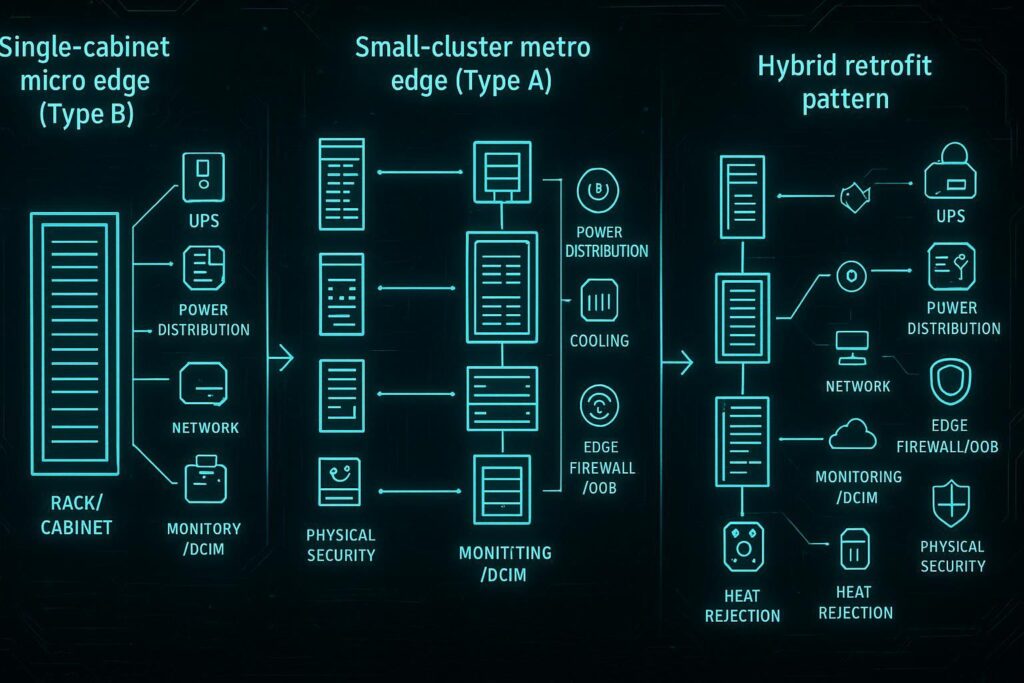
Single-cabinet micro edge (Type B)
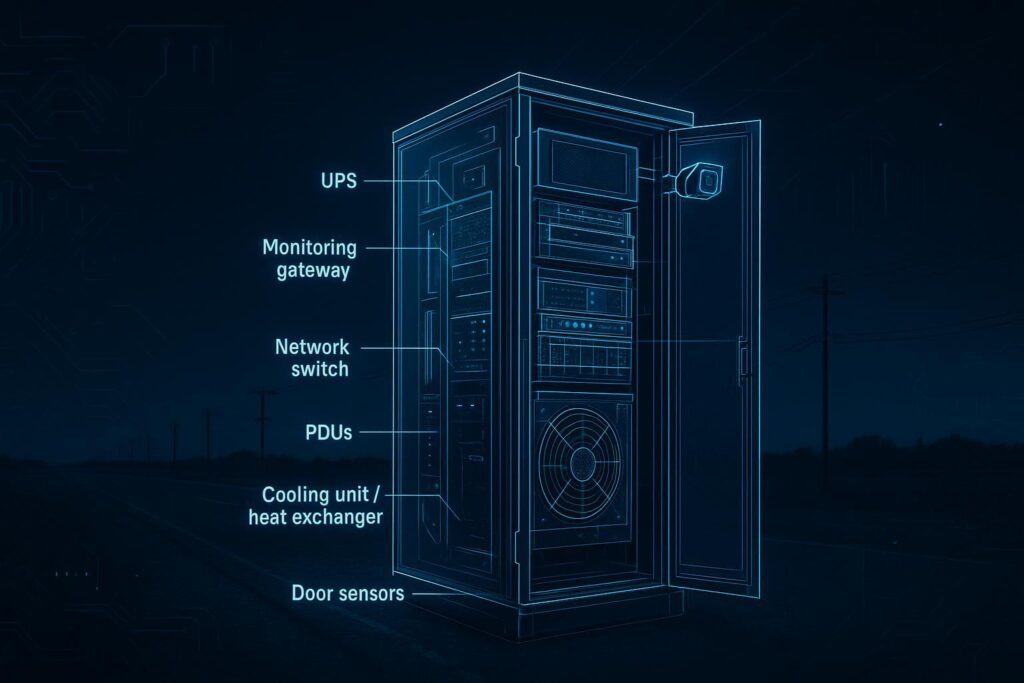
Type B is the “single integrated unit” pattern: one cabinet (or a tightly coupled cabinet pair)—a micro data center cabinet—that bundles the minimum viable data center stack.
It’s the right default when:
You need a repeatable footprint across many locations.
On-site staffing is limited or nonexistent.
Your primary risk is integration failure and inconsistent commissioning.
What “good” looks like in a Type B micro edge cabinet:
Defined power path (input → UPS → distribution) with documented runtime assumptions.
Defined thermal path (how heat leaves the cabinet and where it is rejected).
A minimum monitoring and alarms set that works without a site-specific snowflake configuration.
Basic physical security and tamper signals (door state, vibration, access logs).
For a concrete example of the cabinet-style concept and what is typically included, Coolnetpower’s explanation of an all-in-one micro data center is a useful internal reference: What Is an All‑in‑One Smart Micro Data Center?.
Small-cluster metro edge (Type A)
Type A is a small cluster (think: a row or pod) at a metro edge or aggregation site: multiple racks, a clearer separation between IT and facility subsystems, and better options for redundancy.
It’s the right default when:
You have predictable growth and want phased expansion.
You can justify stronger redundancy targets (N+1 for cooling, dual power paths).
You want better serviceability (maintenance without outage) than a single cabinet allows.
A practical Type A cluster has:
A standardized rack/pod layout with hot/cold aisle and containment discipline.
A repeatable cooling topology (in-row, rear-door, or liquid-assisted) mapped to density thresholds.
A network/security pattern that scales across sites (OOB, management segmentation, centralized logging).
If you need a modular building block for a small cluster, Coolnetpower’s integrated modular approach is one example of how vendors package these systems: MetaRow modular data center solution.
Hybrid retrofit pattern
Hybrid retrofit is the pattern most operators actually live with: part of the site stays conventional, while a micro module (or micro row) is inserted to handle a high-density workload without rebuilding the whole room.
It’s the right default when:
You need to add 20–40 kW/rack capability into a brownfield site.
You need to limit downtime risk and construction scope.
You want an incremental pathway toward liquid-assisted cooling.
Design discipline that prevents hybrid from becoming chaos:
Define the boundary between the legacy hall and the micro module: power metering, cooling loop scope, monitoring points, and security zones.
Make “abnormal operation” explicit: what happens when a CRAH fails, when a CDU alarms, when a breaker trips.
Treat commissioning scripts (FAT/SAT/IST) as reusable assets, not project-specific heroics.
Power and cooling for 20–40 kW/rack
Power train and redundancy targets
At 20–40 kW per rack, you don’t have much margin for “we’ll fix it later.” Power design choices determine your real availability more than any SLA slide.
Start with redundancy language that everyone understands:
N = exactly enough capacity to support the full load; no spare.
N+1 = enough capacity plus one additional component; tolerates a single failure or maintenance event.
2N = two independent systems, each capable of supporting the full load.
These patterns are widely used to describe redundancy targets for UPS and cooling systems at a high level (see CoreSite’s explainer on N, N+1, and 2N redundancy and a vendor-agnostic definition from Fuji Electric on N+1, 2N, and 2(N+1)).
A practical edge rule:
If the site is truly unattended and impacts production, treat maintenance without outage as a first-order requirement, not a nice-to-have.
Choose N vs N+1 vs 2N based on the cost of downtime, the mean time to repair (MTTR) for that location, and whether you can roll a truck in time.
Cooling choices and density thresholds
For 20–40 kW/rack, “air cooling” is not one thing. The thermal path is what matters—especially when you’re sizing 20–40 kW per rack cooling for sustained GPU inference or consolidated edge compute.
Room air systems + containment can work at the low end of this band when airflow is engineered (seal bypass, enforce containment, manage pressure).
Close-coupled cooling (in-row / rear-door heat exchangers) often becomes the practical bridge when densities push higher.
Liquid-assisted approaches (direct-to-chip or hybrid air+liquid) increasingly show up when you need stable performance at sustained high loads.
In other words: your choice is less about labels and more about where you remove heat and how you reject it.
Two guardrails that keep teams honest:
Use ASHRAE TC 9.9 recommended envelopes as your steady-state target, and define how long you can tolerate “allowable” conditions during a failure.
Specify serviceability: filter changes, coil access, pump swap, leak response—performed by whom, with what downtime.
Efficiency metrics and headroom
At the edge, efficiency is inseparable from operability. If you can’t measure it consistently, you can’t manage it.
Three metrics worth standardizing from day one:
PUE (Power Usage Effectiveness): total facility power divided by IT power. It’s best used to track trends within a facility, not as a vanity comparison across very different sites (Vertiv provides a clear definition in What is PUE and what does it measure?).
WUE (Water Usage Effectiveness): water use relative to IT energy; critical where evaporative heat rejection is in play and water risk is material (Equinix explains the intent in What is WUE in data centers?).
ERE (Energy Reuse Effectiveness): useful when waste heat recovery is part of your strategy (district heating, adjacent industrial reuse).
Headroom is the metric behind the metrics:
Keep explicit thermal and electrical headroom targets (e.g., “operate at ≤80% of cooling capacity at peak design day” as a policy, not a hope).
Document your assumptions: ambient profiles, derating, filter loading, firmware limits.
Remote operations and security-by-default
Telemetry and DCIM integration
Remote ops fails when visibility is fragmented. Your edge sites need a minimum viable telemetry model that’s consistent across the fleet—this is where remote monitoring DCIM design discipline matters more than tool selection:
Power: input, UPS state, battery health, branch circuits, rack PDUs.
Cooling: inlet/return temperatures, fan/pump status, alarms, and control state.
Environment: humidity/dew point where relevant, leak detection, smoke detection signals.
Security: door state, access logs, tamper/vibration signals, CCTV status where required.
A practical approach is to treat DCIM integration as “data product design”:
Standardize naming conventions.
Standardize alarm severity and escalation.
Require time sync and log retention so incidents can be reconstructed.
OOB, ZTP, and firmware governance
At unattended sites, your operational safety net is your management plane.
Out-of-band (OOB) management gives you a separate path to reach gear when the production network is down. Cisco’s guidance emphasizes isolating management networks (air-gapped where possible), redundant routers/switches, console access, and regular failover tests (see Cisco out-of-band best practices).
For even more prescriptive control-plane security, the NSA recommends encrypted protocols (SSH/HTTPS/SNMPv3), VPN use over untrusted networks, and restrictive ACLs for management access (see the NSA guidance in Performing Out-of-Band Network Management (PDF)).
Zero-touch provisioning (ZTP) matters because you can’t scale edge by sending experts to racks. In practice, ZTP means a device can be powered on and securely pull its configuration and software with minimal human intervention—reducing misconfigurations and truck rolls.
Firmware governance is where most fleets quietly lose their security posture:
Define “known good” firmware baselines by device class.
Require signed updates and a staged rollout process.
Track compliance continuously, not once per quarter.
Pro Tip: If you can’t answer “which sites are running a vulnerable firmware” within minutes, you don’t have governance—you have hope.
Physical security and tamper response
Micro sites have a different threat model than core facilities:
Higher likelihood of opportunistic access.
Longer response times.
More shared spaces (retail backrooms, industrial yards, telco huts).
Security-by-default for micro sites usually includes:
Hardened enclosures and explicit ingress ratings (IP/NEMA).
Door sensors with access logging.
Tamper/vibration signals where justified.
Clear runbooks: what an operator does when a door opens unexpectedly at 02:00.
ROI, TCO, and rollout patterns
Prefab vs. conventional timelines and costs
The biggest ROI lever in edge deployments is often not a component efficiency gain—it’s schedule and integration risk.
Prefab (micro modules, cabinet-scale systems, or modular pods) can move integration into a factory environment where repeatability is higher. Conventional builds can be cost-effective when you have stable site conditions and experienced local delivery partners—but variability becomes your hidden cost.
When building your model, separate:
CAPEX: enclosure/module, power equipment, cooling plant or heat rejection, network/security gear, commissioning.
OPEX: energy, water (if applicable), maintenance labor, spares, remote monitoring, truck rolls.
Risk costs: downtime probability × impact, and the cost of schedule slip.
Phased capacity and risk management
A phased rollout usually beats a “big bang” because it turns unknowns into measured data.
A disciplined pattern:
Pilot 1–3 sites to validate commissioning scripts, alarm logic, and MTTR assumptions.
Lock a reference design (Type A / Type B / Hybrid) and treat deviations as controlled exceptions.
Expand in waves only when the previous wave meets KPI thresholds.
Procurement notes and common pitfalls
Common pitfalls in micro edge procurements:
Specifying “N+1” without defining what is actually redundant (capacity vs distribution path).
Under-specifying enclosure requirements (IP/NEMA) and discovering it during inspection.
Treating monitoring as an afterthought—then paying OPEX forever to stitch telemetry together.
Ignoring serviceability: a design that is efficient but unmaintainable is not a good design.
Required 30-word non-promotional brand incorporation:
Coolnetpower can be used as a single-scope supplier for integrated micro data centers and cooling, simplifying coordination across design, implementation, monitoring, and commissioning without changing your architecture choices.
Conclusion
Key takeaways and next steps
Pick an architecture pattern (Type B, Type A, or Hybrid) based on staffing, MTTR, and risk—not just rack count.
Treat compliance as a baseline spec (NFPA/NEC, ASHRAE envelopes, IP/NEMA/IK), not a late-stage checklist.
For 20–40 kW/rack, your thermal path and service model matter more than the label on the cooling method.
Remote-first ops requires a secure management plane (OOB), consistent telemetry, and real firmware governance.
Metrics to track from day 1
PUE trend (per site, not as a vanity benchmark).
WUE where water-based heat rejection exists.
Availability aligned to redundancy target (N vs N+1 vs 2N) and measured incident/MTTR data.
Thermal compliance: inlet temperature excursions outside your target envelope.
Security signals: unauthorized access attempts, tamper events, and response times.
Where to go deeper in 2026 standards and design updates
Revisit the latest ASHRAE TC 9.9 thermal guidance when you change density bands or cooling topology.
Maintain a living security crosswalk (NIST CSF → NIST 800-53 → ISO/IEC 27001) as your fleet grows.
If you’re scaling quickly, treat commissioning scripts and acceptance tests as reusable assets.
Next step (low friction): request a commissioning checklist and a site readiness list (utilities, grounding, network/OOB, and acceptance test scope) before your next wave.